5 - Make Sidekick Plugin
Sidekick Introduction
AEM Sidekick is a browser extension that allows you to take actions while your page is open. You can preview, publish, open your document for editing, and much more.

This step assumes the following:
- You have completed the previous steps.
- You are running your project locally with
aem up - You have the Sidekick extension installed for your browser.
- You have a page w/ tags open at
localhost:3000
View current sidekick.js
- /tools/sidekick/sidekick.js (JavaScript)
import toggleScheduler from '../scheduler/scheduler.js';
import initQuickEdit from '../quick-edit/quick-edit.js';

export default async function init(sk) {
  // Handle button clicks
  sk.addEventListener('custom:scheduler', toggleScheduler);
  sk.addEventListener('custom:quick-edit', initQuickEdit);

  // Show after all custom decoration is finished
  sk.classList.add('is-ready');
}
Notes:
-
This
sidekick.jsfile exports a simple init function. It's loaded during the lazylazy.jscycle of the page loading lifecycle. -
You are never guaranteed when SK will be loaded, so we plan for two scenarios in lazy.js
- It's already in the DOM.
- Wait for a document event.
-
We already have two plugins wired up: Schedule Simulator & Quick Edit.
-
We gate the visibility of Sidekick based on our own
is-readyclass. This allows you to change the visual appearance of Sidekick without any FOUC (flashes of un-styled content).
Update Sidekick & support local development
We will update our sidekick.js file to make it a little more friendly for local development. We'll also add an import to our view-tag.js file.
- /tools/sidekick/sidekick.js (JavaScript)
import toggleScheduler from '../scheduler/scheduler.js';
import initQuickEdit from '../quick-edit/quick-edit.js';
import toggleTags from '../tag-view/tag-view.js';

function getLocalButton(sk, selector) {
  const theme = sk.shadowRoot.querySelector('theme-wrapper');
  const pab = theme.querySelector('plugin-action-bar');
  const ab = pab.shadowRoot.querySelector('action-bar');
  return ab.querySelector(selector);
}

function localEvent(sk, featName) {
  const btn = getLocalButton(sk, `.${featName}`);
  if (btn) return;
  console.log(`Button for "${featName}" not found. Firing event.`);

  const opts = { detail: true, bubbles: true, composed: true };
  const viewTagsEvent = new CustomEvent(`custom:${featName}`, opts);

  sk.dispatchEvent(viewTagsEvent);
}

function handleLocalDev(sk) {
  // Give SK time to build its shadow DOM.
  setTimeout(() => {
    // Comment out when finished developing
    localEvent(sk, 'view-tags');
  }, 1000);
}

export default async function init(sk) {
  // Handle local development
  const { hostname } = window.location;
  if (hostname === 'localhost') handleLocalDev(sk);

  // Handle button clicks
  sk.addEventListener('custom:scheduler', toggleScheduler);
  sk.addEventListener('custom:quick-edit', initQuickEdit);
  sk.addEventListener('custom:view-tags', toggleTags);

  // Show after all decoration is finished
  sk.classList.add('is-ready');
}
Notes:
-
In order to add a button to Sidekick to fire an event, you need to update the
sidekickobject in Config Bus. We will consider this step extra credit at the end of this lab. -
You may want to work on your Sidekick plugin before you show a button to your authors. The code above provides affordances for such a use case:
- If on local, look for an existing button after a 1 second delay. This gives SK time to build its DOM.
- If no button is found (i.e. feature is not in production), fire an event to simulate a button click.
Add plugin
We'll need both JS & CSS...
Javascript
- /tools/tag-view/tag-view.js (JavaScript)
import { loadStyle } from '../../scripts/ak.js';

const DIALOG_NAME = 'sk-view-tags-dialog';

function toggleDialog(dialog) {
  if (dialog.open) {
    dialog.close();
  } else {
    dialog.showModal();
  }
}

function getTags() {
  const metaTags = [...document.head.querySelectorAll('[property="article:tag"]')];
  const tagEls = metaTags.map((el) => {
    const para = document.createElement('p');
    para.textContent = el.getAttribute('content');
    return para;
  });
  const wrapper = document.createElement('div');
  wrapper.className = 'tag-list-wrapper';
  wrapper.append(...tagEls);
  return wrapper;
}

function getNewDialog() {
  const dialog = document.createElement('dialog');
  dialog.className = DIALOG_NAME;
  dialog.setAttribute('closedby', 'any');

  const title = document.createElement('p');
  title.className = 'tags-view-title';
  title.innerText = 'Tags';

  const closeBtn = document.createElement('button');
  closeBtn.addEventListener('click', () => { dialog.close(); });
  closeBtn.innerText = 'Close';

  const tagWrapper = getTags();

  dialog.append(title, closeBtn, tagWrapper);
  document.body.append(dialog);

  return dialog;
}

export default async function toggleTags() {
  await loadStyle(`${import.meta.url.replace('js', 'css')}`);

  // If dialog already exists, use it.
  const dialog = document.querySelector(`dialog.${DIALOG_NAME}`) || getNewDialog();

  toggleDialog(dialog);
}
Notes:
- We try to find an existing dialog. If it doesn't exist, we create one.
- We are using the modern
dialogelement which includes many accessibility improvements. - Creating a dialog will also check the page for our meta tags.
- Toggle will simply close or open the dialog.
- We're not building anything highly interactive, so we're not bothering with a Web Component. If you're worried about style pollution, you may consider building a Web Component.
Styles
- /tools/tag-view/tag-view.css (css)
.sk-view-tags-dialog {
  position: relative;
  width: 480px;
  min-height: 120px;
  max-height: 320px;
  overflow-y: auto;
  padding: 24px 32px;
  border-radius: 16px;
  border: none;

  .tags-view-title {
    font-weight: 600;
    line-height: 1;
    margin: 0 0 16px;
  }

  .tag-list-wrapper {
    display: grid;
    grid-template-columns: 1fr 1fr;
  }

  p {
    margin-block: 8px;
  }

  button {
    position: absolute;
    top: 12px;
    right: 12px;
    border: none;
    background: #efefef;
    border-radius: 8px;
    font-weight: 600;
    padding: 8px 16px;
  }
}
Test it
Head back to your browser and refresh your page on http://localhost:3000.
If Sidekick is not open, open it. You should see a modal with your page's tags.
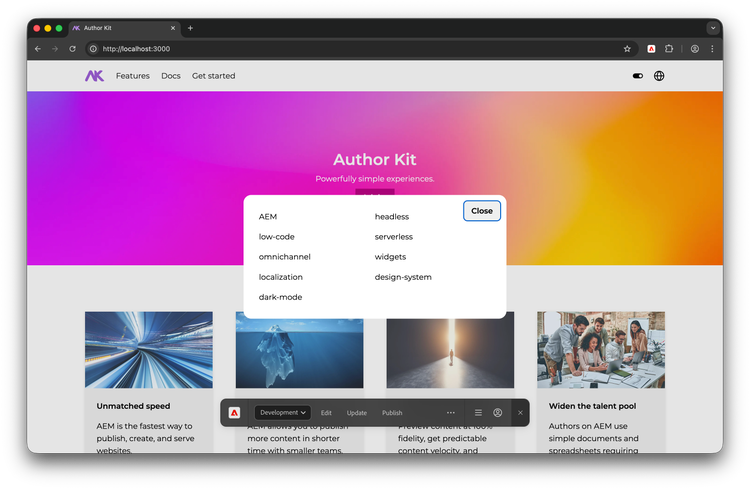
Success!
You've created a Sidekick plugin that surfaces the tags used on the page.