Preflight
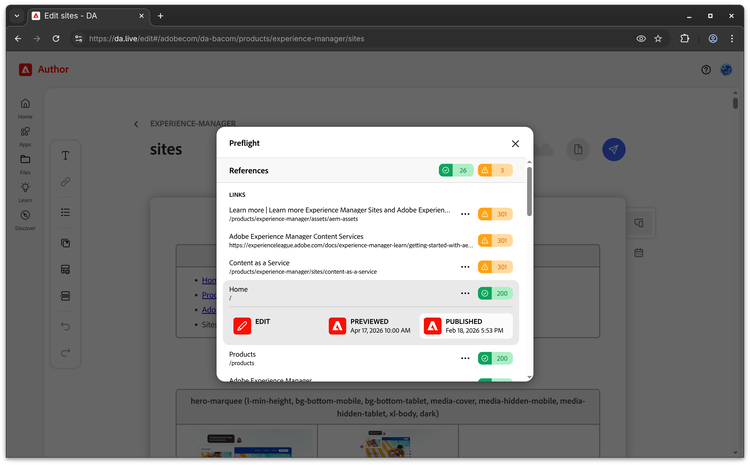
Introduction
Preflight is an always-on plugin in the Prepare menu that automatically checks your document for common issues before you preview or publish.
What Preflight checks
Preflight runs a series of automated checks across several categories:
References
- Fragments not currently published.
- Internal and external links not reachable.
Content quality
- Placeholder text left in the document (e.g. "Lorem ipsum").
SEO
- Missing or duplicate page titles and meta descriptions.
- Missing H1 or multiple H1s on a single page.
Using Preflight
- Open any document in DA.
- Click the Prepare menu button near the preview and publish controls.
- Select Preflight.
- Review the results. Issues are grouped by category and severity.
- Fix any flagged issues and run Preflight again to confirm.
Severity levels
- Error - Issues that are likely to negatively impact your content.
- Warning - Issues that may be intentional but are worth reviewing.
- Info - Informational notes.
- Success - A check considered successful.
Notes
Extensibility
You can provide your own custom version of Preflight by supplying a plugin with the same title in your prepare config. You would simply point to your own preflight MFE implementation.
Reporting
If you're looking for a rollup or health check style report for your entire site, we recommend AEM Sites Optimizer which can serve as a reporting tool and provide additional checks that go beyond what is provided from DA.